
Video creation changed completely over the past year. What required expensive cameras and professional editors now happens in minutes through AI video tools. Three tools dominate creator conversations. CapCut gives you social media editing for free. Runway generates cinematic footage from text prompts. Pictory transforms blog posts into finished videos.
I tested all three extensively, creating TikTok clips, marketing videos, and experimental films. The differences matter way more than feature lists suggest.
Comparing Strength of Each Platform
CapCut lives and breathes social media. ByteDance built it for TikTok, Reels, and Shorts creators. Upload clips and the AI video tool automatically cuts them to music, removes filler words, and suggests viral templates. The free tier includes auto captions in 100+ languages, AI avatars, background removal, and 1080p exports. The catch is a 15-minute video limit and instability beyond that length.
Runway generates video content that doesn’t exist yet. Type “drone flying through neon-lit Tokyo streets at night” and Gen-4 creates actual footage. Upload a product photo and transform it into different settings without reshooting. The results look genuinely cinematic when you nail the prompt, but getting there requires learning prompt engineering and accepting inconsistent results.
Pictory transforms written content into video at scale. Paste a blog URL, and Pictory extracts key points, matches them with stock footage, adds AI voiceovers, and exports a complete video. I turned a 1,500-word article into a professional three-minute video in under 10 minutes. Marketing teams love multiplying the value of written content without video specialists.
A Glimpse at AI Video Tool Comparison
Here’s how these three platforms stack up across the factors that actually matter when you’re choosing a video tool.
| Feature | CapCut | Runway | Pictory |
| Best For | Social media content (TikTok, Reels, Shorts) | Creative video generation and VFX | Repurposing blogs and written content |
| Primary Strength | Speed and trending templates | AI-generated cinematic footage | Text-to-video automation |
| Learning Curve | Easy (2-4 hours) | Steep (requires prompt engineering) | Moderate (1-2 days) |
| Free Tier | Generous (most features included) | Limited trial credits | None (paid plans only) |
| Starting Price | Free | $12/month (Standard, 625 credits) | $23/month (30 videos) |
| Professional Price | $20/month (Pro) | $76-95/month (Unlimited) | $99/month (Teams) |
| Video Length Focus | Under 15 minutes (optimized for 15-60 seconds) | Unlimited (short AI generations) | 3-15 minutes typical |
| Export Quality | Up to 4K (Pro tier) | Up to 4K | Up to 1080p |
| Auto Captions | Yes (100+ languages, excellent) | No | Yes (with transcription) |
| Stock Library | Built-in music and effects | No stock footage | Getty Images, Storyblocks integration |
| AI Voice Quality | Natural (standard voices) | Not included | Premium with ElevenLabs |
| Background Removal | One-click (excellent quality) | Professional-grade (best in class) | Basic |
| Template Library | Thousands of trending templates | Minimal | Business-focused templates |
| Generation Speed | Instant editing | 1-5 minutes per generation | 5-15 minutes per video |
| Mobile App | Yes (iOS, Android) | iOS only | Web-based only |
| Team Collaboration | Limited | Workspace features (Pro+) | Full collaboration (Teams plan) |
| Privacy Concerns | ByteDance data collection | Standard cloud processing | Standard cloud processing |
| Best Output Type | Short-form social videos | Experimental/creative footage | Marketing and explainer videos |
| Ideal User | Daily social media creators | Filmmakers, creative agencies | Marketers, bloggers, educators |
CapCut: Editor’s Top Choice
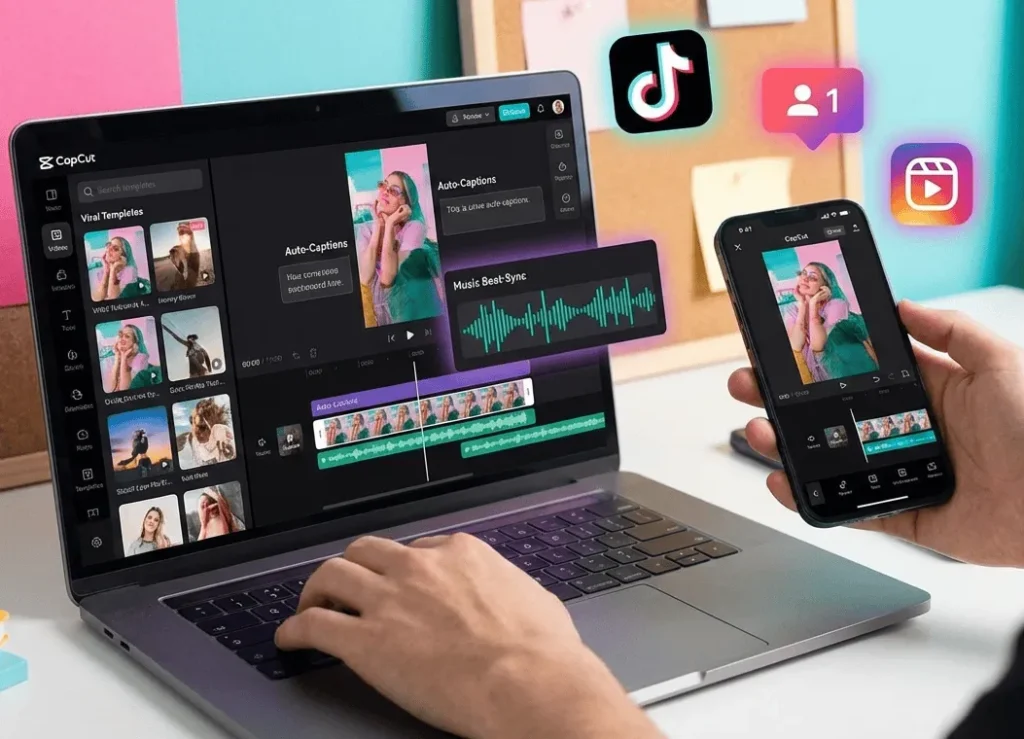
Templates save enormous time by letting you swap in clips rather than building from scratch. This AI video tool cuts footage to music beats surprisingly well for travel vlogs and product reviews. Cross-platform syncing works flawlessly between phone, tablet, and desktop.
Auto captions appear accurately in 100+ languages with customizable styles, removing filler words automatically. Many creators report 80% higher watch time after adding captions. This feature alone justifies using CapCut for social content.
Limitations surface beyond short-form content. Try editing a 30-minute YouTube video and expect crashes. Color grading feels basic. Audio mixing lacks depth. ByteDance’s data collection raises privacy concerns for business content, though it’s standard for personal social media.
Runway: Simulate any Business Decision

Gen-4 produces impressive results after learning effective prompting. I generated product demos and impossible camera movements that would cost thousands traditionally. Background removal handles complex hair perfectly. Frame interpolation creates smooth slow motion. For professionals needing these capabilities regularly, Runway justifies its cost through time savings.
But friction is real. My first 15-generation attempts looked strange. You must understand how to describe motion, angles, and lighting in ways an AI video tool interprets correctly. The Standard plan at $12 monthly provides only 625 credits for maybe 10-15 generations. The Unlimited plan costs $76-95 monthly, pricing out freelancers. Unpredictability means you can’t rely on Runway for tight client deadlines without buffer time.
Pictory: Best Text to Video Tool

Pictory executes one workflow exceptionally well. Marketing teams producing multiple videos weekly find the efficiency transformative. Stock library integration provides huge value, pulling Getty Images and Storyblocks footage directly during editing.
Voice quality improved with ElevenLabs integration. Premium voices pass as human. You can clone your own voice for consistent branding. However, the platform frustrates when you need creative control. Limited transition options. Clunky timing adjustments. Customer support lags according to reviews.
Pricing starts at $23 monthly for 30 videos. Serious users need $39-99 plans. Value depends entirely on your content volume.
CapCut vs Runway vs Pictory
Choose CapCut for daily TikTok, Reels, or Shorts content. You need trending templates and fast editing over advanced features. Tight budget and comfortable with privacy tradeoffs. The free tier handles social media growth needs.
Pick Runway when generating impossible or expensive footage. Creative projects with flexible deadlines. Budget for the Unlimited plan or infrequent content creation. You enjoy prompt refinement. Clients expect visual innovation beyond stock footage.
Select Pictory for repurposing written content at scale. Marketing departments, bloggers, educators, and agencies benefit most. Time savings matter more than creative control. The subscription cost makes sense in relation to the content volume.
Many creators use multiple tools strategically. Generate unique shots in Runway, edit with CapCut’s templates, or turn your blog into a video with Pictory.
Test Rather Than Theorize
AI video tools accelerate production but don’t guarantee quality without human judgment. CapCut’s templates work if you understand trending content. Runway’s generations improve with better prompts through practice. Pictory’s selections need review before publishing.
Test rather than theorize. CapCut offers generous free access. Runway provides trial credits. Pictory includes money-back guarantees. Create actual content with your real workflow and evaluate honestly.
The AI video revolution democratizes access to creation and lets skilled creators produce more in less time. Choose based on actual content needs, not feature lists. The right tool makes creation effortless, while the wrong tool creates frustration.